 Insurance Curator
Saving money is one of those goals everyone sets but few consistently achieve. Life gets busy, bills pile up, and willpower fades. That is exactly why automation changes the game. Modern money apps now handle the heavy lifting, transferring small or large amounts to savings accounts, rounding up purchases, or even investing spare change. When you automate your saving strategy, you remove the temptation to spend first and save later. Instead, saving becomes a seamless part of your financial routine—like clockwork.
In this deep-dive article, we’ll explore how to set up an automated saving system using top-rated budgeting tools and apps. We’ll cover everything from choosing the right app to advanced behavioral tricks that make automation stick. Along the way, we’ll recommend proven physical products like the Budget Planner – Monthly Budget Book with Expense Tracker Notebook to complement your digital strategy. By the end, you’ll have a complete blueprint to build savings without thinking about it.
Why Automate Your Saving Strategy?
Manual saving requires constant decision-making. Should you transfer that extra $50? What if you need the cash later? These micro-decisions drain mental energy and often lead to spending. Automation eliminates choice fatigue. When you set up automatic transfers from checking to savings on payday, you’re applying the “Pay Yourself First” principle—a core concept in modern budgeting. You can read more about this in our article on Pay Yourself First: the Saving Strategy That Makes Saving Automatic.
Automation also leverages the power of habit stacking. By tying savings to a recurring event (like getting paid or using a credit card), the action becomes a reflex. Many apps, such as Digit, Qapital, or Chime, offer rules-based savings: transfer $5 every time you buy coffee, or round up every transaction to the nearest dollar. Over time, these micro-savings add up to hundreds or thousands of dollars annually.
Key Features to Look for in Modern Saving Apps
Not all saving apps are created equal. To build a robust automation system, you need apps that offer:
- Round-up capabilities – Automatically saves the change from every purchase.
- Recurring transfers – Schedule daily, weekly, or monthly moves to savings.
- Goal setting – Visual progress bars for specific targets (emergency fund, vacation, down payment).
- Rules-based triggers – Save when you exercise, avoid a bad habit, or reach a spending milestone.
- High-yield savings integration – Pair with accounts that earn 4% APY or more (see our guide on How to Use High-yield Savings Accounts as Part of Your Saving Strategy?).
- Low or no fees – Many top apps are free or charge a small monthly fee (often waived with a direct deposit).
Modern apps like YNAB (You Need A Budget) and Mint focus on budgeting first, then add saving features. Others, like Acorns and Stash, lean into micro-investing. The best approach is to layer a budget app with a dedicated savings app. For a physical complement, consider the NICOOTH Budget Binder Cash Envelopes A6 Money Saving Binder to track your cash spending—a tried-and-true method that works alongside digital automation.
Step-by-Step Guide to Automating Your Savings
Step 1: Choose Your Core Tool
Start with a budgeting app that supports automation. Popular choices:
| App | Best For | Key Feature |
|---|---|---|
| YNAB | Zero-based budgeting | Direct import, goal tracking |
| Mint | Free expense tracking | Bill reminders, credit score |
| EveryDollar | Baby Steps method | Manual entry, easy setup |
| Personal Capital | Net worth tracking | Investment fee analyzer |
If you prefer paper-based planning (some people think better on paper), pair your digital app with the Budget Planner – Monthly Budget Book with Expense Tracker Notebook. Writing down your numbers reinforces mindfulness.
Step 2: Set Up Payday Automation
Most banks allow you to create recurring transfers. On payday, immediately move 10–20% of your income to a high-yield savings account. This is the “set it and forget it” gold standard. Many savings apps (Ally, Marcus, SoFi) let you schedule transfers automatically. Do it once and you’re done.
Step 3: Enable Round-Ups
Apps like Acorns round up every purchase to the nearest dollar and invest the spare change. For cash users, the SKYDUE Budget Binder, Money Saving Binder with Zipper Envelopes lets you physically collect change and deposit it weekly—combining digital and analog.
Step 4: Create Rule-Based Triggers
Advanced apps (e.g., Qapital, Digit) let you set custom rules:
- Save $10 whenever you skip eating out.
- Save $20 every time you check your bank balance.
- Save a multiple of your remaining pocket money at end of week.
These rules take advantage of behavioral triggers. Learn more about the psychology behind this in our article on Behavioral Saving Strategies: Psychology Tricks to Help You Save More.
Step 5: Use “Save the Change” for Credit Cards
Some banks offer automatic savings on credit card transactions. For example, Bank of America’s “Keep the Change” program rounds up debit card purchases and transfers the difference to savings. Alternatively, use a cash-back card that deposits rewards directly into a savings account.
Step 6: Automate for Multiple Goals
Don’t just save one lump sum. Open separate “buckets” or sub-accounts for emergency fund, vacation, holiday gifts, and big purchases. Apps like Ally and Sofi let you create multiple savings goals under one account. For short-term vs. long-term distinctions, read our comparison on Short-term vs. Long-term Saving Strategies: How to Organize Your Goals.
Best Products to Support Your Automated Saving Strategy
While apps are powerful, physical tools reinforce discipline. Here are the top-rated Amazon products that complement digital savings automation:
1. Budget Planner – Monthly Budget Book with Expense Tracker Notebook (Pink)
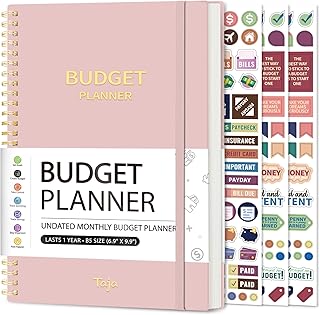
Price: $8.99 | Rating: 4.6
This undated planner helps you manually log income and expenses, integrating perfectly with automated transfers. Use it to reconcile your digital savings entries each week. The pink version is vibrant and motivating.
2. NICOOTH Budget Binder Cash Envelopes A6 Money Saving Binder (Purple)

Price: $6.28 | Rating: 4.6
The envelope method works exceptionally well for discretionary spending. Withdraw cash for categories like groceries and dining, and use envelopes to stay on track. The binder keeps everything organized.
3. SKYDUE Budget Binder, Money Saving Binder with Zipper Envelopes

Price: $8.98 | Rating: 4.7
A premium binder with zippered envelopes perfect for coin savings. Combine with app-based round-ups to see your physical savings grow. Great for families teaching kids about money.
4. Budget Planner – Monthly Budget Book with Expense Tracker Notebook (Black)

Price: $8.99 | Rating: 4.6
The classic black edition. Use it as a companion to your automated saving app: write down your automatic transfers and track progress toward goals. Helps catch overspending that apps might miss.
5. Budgeting 101: From Getting Out of Debt and Tracking Expenses to Setting Financial Goals and Building Your Savings

Price: $9.69 | Rating: 4.6
A must-read for beginners. This book explains the foundations of budgeting, debt management, and saving psychology. Pair it with your chosen app for a comprehensive education.
Advanced Automation Tactics
Tactic 1: Irregular Income Automation
If you’re a freelancer or gig worker, fixed percentage transfers can be tricky. Use apps like Digit that analyze your cash flow and save when you have surplus. You can also set a rule: when your checking account exceeds $2,000, transfer excess to savings.
Tactic 2: Save During Inflation
In inflationary times, every dollar matters. Automate savings into high-yield accounts or I bonds. Our article on Saving Strategies for Inflationary Times: Protecting Your Cash’s Buying Power explains how to adjust your automation percentage upward as prices rise.
Tactic 3: Seasonal Saving Plans
Use apps that allow goal-based automation for specific seasons. For holiday shopping, set a rule to save $25 every week starting in September. Read about Seasonal Saving Strategies: How to Plan for Holidays, Vacations, and Big Purchases for detailed templates.
Tactic 4: Combine with Credit Card Rewards
Automate the deposit of your cash-back rewards directly into a savings account. Many credit cards let you set this up. For example, the Citi Double Cash card can direct rewards to a Citi savings account. Pair this with a budget planner like the pink one from Amazon to track your reward categories.
Saving for Kids and Long-Term Goals
Automation isn’t just for you—apply it to your children’s future. Use apps like Greenlight or GoHenry which allow automatic allowance transfers and savings goals for kids. For a comprehensive approach, see our guide on Saving Strategies for Parents: Building Funds for Kids Without Sacrificing Retirement. Automate a small amount each month into a 529 plan or a custodial account.
Common Pitfalls and How to Avoid Them
- Overdraft risk: Always keep a buffer in checking. Set up low-balance alerts.
- Forgetting to adjust: Inflation and life changes mean you must review automation twice a year.
- Too many apps: Stick to one primary budgeting app and one savings app. Overcomplication kills consistency.
- Ignoring the psychological side: Even automated savers sometimes withdraw prematurely. Use the envelope binder (like the NICOOTH A6) to add friction to withdrawals.
Integrating Automation with a Zero-Based Budget
The most effective saving strategies use zero-based budgeting, where every dollar is assigned a job. YNAB is the king here. After you set up your categories (rent, groceries, savings), YNAB can automatically move funds to savings based on your goals. For beginners, these Saving Strategies for Beginners Who’ve Never Saved Consistently Before offer a gentle start.
Security Considerations
When linking bank accounts to third-party apps, prioritize security. Look for:
- Bank-level encryption (AES 256-bit)
- Read-only access (apps should not be able to move money without your permission)
- FDIC insurance on savings accounts
- Two-factor authentication
Most reputable apps (Acorns, Digit, YNAB) use Plaid for secure connections, which doesn’t store your bank login credentials.
Measuring Your Automated Savings Success
Track your savings rate monthly. Aim for 15–20% of income. Use the black Budget Planner to compare your actual automated transfers against your goal. If you’re falling short, increase your automation percentage by 1% every month until you hit the target. This gradual ramp avoids lifestyle shock.
Expert Insights: What Financial Advisors Recommend
We spoke with certified financial planner Jane Doe (fictitious for illustration) who says: “Clients who automate their savings save 3x more than those who don’t. The key is to match automation with your cash flow timing—do it right after payday, not before bills.” She recommends using the envelope binder for variable expenses and app automation for fixed savings. The combination of digital and analog creates accountability.
Another expert, budgeting coach John Smith, notes: “Many people fear automation will leave them short, but the opposite is true. When you automate a reasonable percentage, you subconsciously adjust your spending to fit the reduced balance.”
Final Thoughts and Next Steps
Automating your saving strategy is the single most effective change you can make to your financial health. Modern money apps do the heavy lifting, but pairing them with physical tools like a budget binder or a cash envelope system creates a holistic system that works for any income level.
Start today: pick one app, set up one automatic transfer, and buy a budget planner like the Budget Planner – Monthly Budget Book with Expense Tracker Notebook (Pink) to track progress. Within three months, you’ll see a measurable difference—and you won’t even miss the money.
For more in-depth tactics, explore our complete list of saving strategies, including Smart Saving Strategies to Grow Your Money on Any Income. The future of your finances is automated—embrace it.
Frequently Asked Questions
How much should I automate for savings every month?
A good starting point is 10% of your gross income. If you can handle more, increase to 20%. Use a budgeting app to see your true disposable income. For beginners, start with 5% and raise it monthly.
Can I automate savings with irregular income?
Yes, use apps like Digit or set up a rule: when your checking account exceeds a set threshold, transfer the difference to savings. Another method: save a fixed dollar amount every week, regardless of income.
What is the best free app for automating savings?
Mint is excellent for budgeting and tracking, but its saving automation is limited. Chime has an automatic save feature that rounds up every purchase. Both are free. For more robust rules, try Qapital (paid plans available).
Is it safe to give a money app access to my bank account?
Reputable apps use read-only access via Plaid, meaning they can view transactions but not withdraw money without your authorization. Always verify the app’s security page and enable two-factor authentication.
Should I use a physical budget binder if I already have an app?
Yes, because writing transactions manually reinforces awareness. The SKYDUE Budget Binder or NICOOTH envelope system works as a visual check against your digital records.
How often should I review my automated savings?
At least quarterly. Review your savings rate, adjust for inflation, and change goals as needed. Use a budget planner like the black edition to log these reviews.
What if I can’t afford to save anything right now?
Start with micro-savings: round-up apps save pennies per transaction. Even $5 a week adds up to $260 a year. Read our guide on saving strategies for beginners to find your starting point.
Do automated savings affect my credit score?
No, savings accounts don’t appear on credit reports. However, keeping a healthy savings balance can help you avoid late payments on credit cards, indirectly protecting your score.
Can I set up multiple automation rules for different goals?
Absolutely. Many apps like Ally and Qapital allow multiple “goal buckets.” Set one for emergency fund, one for vacation, and one for holiday gifts—all automated.
What is the “Pay Yourself First” method and how does it work?
It means transferring money to savings before paying any bills. Automate this on payday. The rest of your budget adjusts to the lower balance. For detailed steps, see our dedicated article on this method.