 Insurance Curator
Picture this: you wake up, check your phone, and see a notification that someone bought your budget planner template while you were asleep. No inventory to ship, no customer service calls, and the product was delivered automatically. That is the reality of creating digital products for passive income.
But here’s the twist—success in this space often starts with budgeting. Yes, the same skill that helps you manage your monthly expenses is the foundation for building a digital product business that pays you repeatedly. In this deep dive, we’ll walk through every step, from idea to automation, using real market data to guide your decisions.
Why Digital Products Are the Best Fit for Passive Income
Digital products—think printable planners, spreadsheets, e-books, templates, and online courses—offer something physical products can’t: zero marginal cost. Once you create the file, you can sell it an unlimited number of times without restocking.
This aligns perfectly with a budgeting mindset. You keep startup costs low (often under $50), avoid warehousing fees, and reinvest your profits into creating more products. According to industry benchmarks, top digital creators earn between $1,000 and $10,000 per month from passive digital sales.
Internal resource: If you’re new to the concept, read What Is Passive Income? Realistic Ways to Earn Money While You Sleep? to understand how digital products fit into the bigger picture.
Step 1: Ideation – Finding a Niche That Sells
The biggest mistake beginners make is creating what they want instead of what the market demands. Budgeting is a massive niche—people hunt for ways to control spending, save money, and track expenses. But within that, there are sub-niches: debt payoff trackers, cash envelope systems, monthly budget binders, and even digital versions of physical products.
How to Validate Your Idea Without Spending a Dime
Start with Amazon. Yes, Amazon sells physical products, but those listings are goldmines for keyword research. Look at the top-selling budget planners:
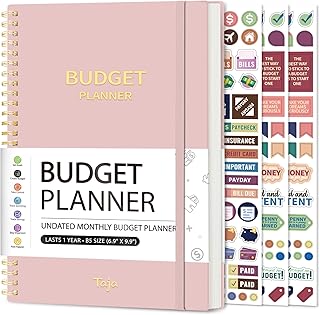 – $8.99, 4.6 stars, thousands sold.
 – $8.98, 4.7 stars.
 – $9.69, 4.6 stars.
These are all physical products, but the demand is undeniable. Your job is to digitize what works. Create a PDF budget planner, a Notion expense tracker template, or a Google Sheets budget spreadsheet. People who love the physical product will also want a digital version they can edit, print, or use on their tablet.
Key takeaway: Search Amazon for “budget planner,” “budget binder,” or “expense tracker” and note the ratings, prices, and features. Then create a digital version that improves on those features.
Step 2: Product Creation – From Concept to Downloadable File
Now you have an idea validated by real sales data. Time to build your digital product.
Tools You’ll Need (Mostly Free or Low-Cost)
| Tool | Purpose | Cost |
|---|---|---|
| Canva | Design printables, planners, e-books | Free / Pro $12.99/mo |
| Google Sheets | Create spreadsheet templates | Free |
| Notion | Build interactive dashboards | Free for personal use |
| Affinity Publisher | Advanced layout for PDFs | One-time $54.99 |
| Adobe InDesign | Professional publishing | $22.99/mo |
Creating a Digital Budget Planner: A Mini Case Study
Using the Amazon data above, let’s create a digital product that mirrors the popular SKYDUE Budget Binder. That binder includes cash envelopes, expense sheets, and budget tracking pages.
Your digital version could include:
- Editable PDF budget sheets – monthly and yearly trackers
- Printable cash envelope templates – ready to cut and fold
- A digital expense tracker – linked to Google Sheets for automatic calculations
- A bill calendar – one-page overview for due dates
Design each page in Canva or Affinity. Keep the aesthetic clean and minimalist to appeal to the same demographic that bought the physical binder. Since the physical version has a 4.7 rating, you know the layout and features resonate.
Pricing Strategy
Physical budget planners sell for $6–$10. Your digital version can sell for $5–$15, depending on the complexity and number of pages. A complete digital bundle (including spreadsheets, PDFs, and instructions) can go for $12–$20.
Pro tip: Offer a freebie (e.g., a single monthly budget sheet) to build an email list. Then upsell the full planner bundle.
Step 3: Setting Up Your Sales Channel – Low-Cost, High Automation
You don’t need a website to start selling digital products. Use established marketplaces that already attract budget-conscious buyers.
Top Platforms for Digital Products
- Etsy – Perfect for printables and planners. Search volume for “digital budget planner” on Etsy is high.
- Gumroad – Best for spreadsheets, Notion templates, and courses.
- Teachers Pay Teachers – Surprisingly good for budget planners (teachers love organization).
- Your own website (Shopify, WordPress + WooCommerce) – Takes more work but higher margins.
Automating Delivery and Passive Income
All these platforms allow instant digital delivery. You upload the file once, set a price, and every sale is automated. No packing, no shipping, no questions like “where’s my package?”
To truly make it passive, you must also automate marketing. We’ll cover that in the next step.
Step 4: Marketing Your Digital Product on a Shoestring Budget
Here’s where the budgeting context shines again. You don’t need a huge ad spend. Use free and nearly free strategies.
1. SEO-Optimized Product Listings
On Etsy and Gumroad, treat your product page like a blog post. Use keywords from Amazon, such as “budget binder,” “cash envelopes,” “expense tracker,” “monthly budget book.” Write a compelling description that mirrors the benefits shown in popular physical products like the NICOOTH Budget Binder Cash Envelopes A6 Money Saving Binder with Zipper envelopes (Purple) (4.6 stars, $6.28).
Include screenshots of your digital product in use—on a tablet, printed out, or inside a binder. That visual proof builds trust.
2. Pinterest Marketing (Free Traffic)
Pinterest is a search engine for planners and printables. Create pins that showcase your budget planner pages. Link directly to your product. Pinterest users actively search for “printable budget planner” and “free expense tracker.”
3. Social Media Content
Post before/after budget progress on Instagram or TikTok. Show how your digital template helped someone save $500 in a month. Even better—create a short video walking through your planner’s features. Tag it with #budgeting #passiveincome #digitalplanner.
4. Email List (Build It Slowly)
Offer a free budget tracker in exchange for an email address. Once you have 100–200 subscribers, email them about your paid bundle. This is a very low-cost way to drive sales.
Learn more: For additional low-capital ideas, check out Beginner-friendly Passive Income Ideas That Don’t Require Huge Capital.
Step 5: Scaling Your Passive Income – From One Product to a Portfolio
Once your first digital product is generating consistent sales (even $50/month), it’s time to scale.
Product Line Expansion
Look at the Amazon data again. The Budget Planner – Monthly Budget Book with Expense Tracker Notebook, Undated Bill Organizer & Finance Planner to Take Control of Your Money, Account Book to Manage Your Finances-Black (4.6 stars, $8.99) comes in multiple colors. You can create digital variations: a pastel budget planner, a minimalist black-and-white version, a wedding budget planner, or a small business expense tracker.
Each variation is a new product. Because you already have the design template, creating a variation takes 1–2 hours. But each one can generate passive income independently.
Bundling for Higher Average Order Value
Bundle your digital budget planner with:
- A debt payoff spreadsheet
- A savings goals tracker
- A meal planning sheet (budgeting + grocery savings)
Price the bundle at $19–$25. Customers perceive higher value, and you earn more per sale.
Repurpose into Other Formats
Your budget planner content can become:
- A low-content book (e.g., a prompted journal) sold on Amazon KDP
- A short e-book: “10 Budgeting Hacks Using Spreadsheets”
- A mini course: “How to Set Up a Digital Budget Binder in 30 Minutes”
Each format reaches a different audience segment, all within the budgeting niche.
Step 6: Automating the Passive Income Machine
The ultimate goal is to reach a point where you spend 1–2 hours per month maintaining the business while it generates $500–$2,000.
Tools to Automate
- Printful / Printify – For print-on-demand (if you ever want physical versions of your planners, but keep it digital for true passive income).
- Zapier – Connect Etsy sales to a Google Sheet for tracking, or automatically send a thank-you email with bonus content.
- ManyChat – Set up a chatbot on Facebook Messenger that delivers your free budget template and pitches the paid planner.
- ConvertKit – Automate email sequences where you promote your digital products to new subscribers.
Explore: See How to Use Automation Tools to Turn Active Income into Passive Income? for a full breakdown of automation workflows.
Reinvesting Profits Back into the Business
Use your digital product profits to diversify. For example, after earning $500 from budget planners, you could invest in index funds or dividend stocks. That creates another income stream entirely.
Related: Building Passive Income Streams with Index Funds and ETFs explains how to layer investment income on top of your digital sales.
Common Pitfalls to Avoid
Even with a solid plan, it’s easy to trip up. Here are the most frequent mistakes digital creators make:
- Overpricing too early – Start at $5–$10 to build reviews. Raise the price once you have 20+ sales.
- Ignoring design quality – A pixelated PDF won’t sell. Use vectors, high-resolution images, and consistent fonts.
- Skipping file testing – Download your own product on a different device. Make sure pages align, links work, and fonts render correctly.
- No updates – Budgeting trends change (e.g., zero-based budgeting vs. 50/30/20). Update your product yearly and re-upload.
Watch for: Read Passive Income Pitfalls: Red Flags, Scams, and Overhyped Promises to Avoid to protect yourself from gurus promising instant riches.
Real Numbers: What to Expect in Year One
Let’s be realistic. You won’t make $10,000 in your first month. But you can project based on averages:
| Month | Products Sold (Digital) | Average Price | Revenue | Expenses (Tools, Ads) | Net Passive Income |
|---|---|---|---|---|---|
| 1 | 5 | $8 | $40 | $20 | $20 |
| 3 | 30 | $10 | $300 | $30 | $270 |
| 6 | 100 | $10 | $1,000 | $50 | $950 |
| 12 | 250 | $12 | $3,000 | $100 | $2,900 |
These numbers assume you have 3–5 products and are actively pinning, posting, and optimizing. After month 6, the effort drops significantly as organic SEO and Pinterest traffic pick up.
Deeper dive: Semi-passive Income: Systems That Need Some Work but Pay You for Years explains the “sweat upfront, rewards later” model perfectly.
Your Next Steps (Checklist)
- Research Amazon bestsellers like the Budget Planner – Pink and Budgeting 101 book for feature ideas.
- Choose your first digital product format (PDF, spreadsheet, Notion template).
- Design the product using Canva or Google Sheets. Include 20+ pages for a planner.
- Set up a shop on Etsy or Gumroad.
- Write an SEO-optimized title and description using keywords from Amazon.
- Create 5 Pinterest pins and schedule them daily.
- Offer a freebie to start building an email list.
- Automate delivery and email sequences.
- Track sales and reinvest 20% of profits into paid ads or new product creation.
Frequently Asked Questions
How much money do I need to start selling digital products for passive income?
You can start for under $10. Canva free version, a Google account, and an Etsy shop fee of $0.20 per listing. No inventory costs.
Do I need to be a designer or tech-savvy?
No. Canva has thousands of templates for budget planners. You can customize them with drag-and-drop. Spreadsheets require basic formulas—copy from free templates online.
How long does it take to see passive income?
Most creators see their first sale within 1–4 weeks. Consistent monthly income (over $200) usually arrives by month 3 if you actively market.
Can I sell the same digital product on multiple platforms?
Yes. You can list your budget planner on Etsy, Gumroad, Teachers Pay Teachers, and your own website simultaneously. Just ensure you track inventory (though digital files don’t run out).
What if my product gets copied or shared illegally?
Digital files can be pirated, but most buyers are honest. Focus on adding value (updates, bonus content) that pirates don’t get. Watermark free previews only.
Should I also sell physical budget planners?
You can, but that changes the passive nature. If you want to test physical products, use print-on-demand. However, for true passive income, digital is superior.
Your journey to passive income starts with a single digital file—and a budget for your time and money. Use the real data from Amazon bestsellers to guide your creation, automate your sales, and scale smartly. Within a year, you could have a portfolio of digital products paying you while you sleep.
Ready to design your first budget planner? Start by studying the SKYDUE Budget Binder and creating a digital version that’s even better.
