 Insurance Curator
 Managing your term life insurance policy has never been more convenient—provided you know which login method works best for your lifestyle. Colonial Penn offers both a secure website portal and a dedicated mobile app, each with distinct strengths. Whether you’re checking coverage details, updating beneficiaries, or making premium payments, the choice between app and website can affect your daily experience.
In this deep dive, we’ll compare the Colonial Penn life insurance login process on mobile versus desktop, highlight exclusive features, and show you how to get the most out of your term life insurance policy. We’ll also share expert-recommended resources to help you become a smarter policyholder.
What Is Colonial Penn Life Insurance?
Colonial Penn has been a household name in the insurance industry since the 1950s, known primarily for its simplified issue term life insurance plans. These policies often require no medical exam and offer guaranteed acceptance for individuals aged 50 to 85. The company focuses on providing affordable coverage for final expenses, funeral costs, and small debts.
Your policy is managed entirely online. You can view your coverage summary, pay bills, change personal information, and even file claims through your digital account. The key is knowing how to navigate both the website and the mobile app.
Colonial Penn Website Login: Step-by-Step Guide
Accessing your account from a computer gives you a full-screen view of all policy details. Here’s how to log in:
- Go to the official Colonial Penn login page – bookmark it for quick access.
- Enter your email address or policy number and your password.
- Click “Log In” – you’ll land on your dashboard.
What you can do on the website:
- View all active term life policies.
- Download PDF copies of your policy documents.
- Update your address, phone number, or beneficiaries.
- Set up automatic payments or make one-time payments.
- Access customer service chat and email history.
Pros:
- Larger interface is easier for reading fine print.
- All features are accessible without needing a smartphone.
- Works well with screen readers for accessibility.
Cons:
- Requires a computer or laptop.
- No push notifications for payment reminders.
Colonial Penn Mobile App Login: Step-by-Step Guide
The Colonial Penn mobile app is available for both iOS and Android. It offers a streamlined experience tailored for on-the-go management.
- Download the app from the App Store or Google Play.
- Open the app and tap “Log In.”
- Use the same credentials as your website account.
- Enable Face ID or fingerprint for faster future logins.
What you can do on the app:
- Quickly check your policy status.
- Pay premiums with Apple Pay or Google Pay.
- Receive push notifications for due dates.
- Upload documents for claims directly from your camera.
Pros:
- Faster login with biometric authentication.
- Instant notifications keep you on top of deadlines.
- Optimized for smaller screens.
Cons:
- Some advanced tasks (like printing documents) still require the website.
- Occasional app updates may temporarily disrupt access.
Head-to-Head Comparison: Website vs. App
| Feature | Website | Mobile App |
|---|---|---|
| Accessibility | Requires computer or tablet | Smartphone only |
| Login Speed | 10–15 seconds | 5 seconds with biometrics |
| Document Management | Full download/print | View only, upload for claims |
| Payment Options | ACH, credit/debit, check | Apple Pay, Google Pay, card |
| Notifications | Email only | Push + email |
| Customer Support | Live chat, phone, email | In-app chat, phone |
| Policy Changes | Full control | Limited changes |
Winner depends on your needs. The website offers complete control; the app gives you speed and convenience. Most users benefit from using both.
Common Colonial Penn Life Insurance Login Problems and Solutions
Even a smooth login process can hit a snag. Here are frequent issues and how to fix them:
- Forgot password – Use the “Reset Password” link on the login page. You’ll receive a temporary code via email.
- Account locked – After 5 failed attempts, your account is locked for 30 minutes. Wait or contact support.
- Browser issues – Clear your cache or try a different browser (Chrome, Firefox, Edge).
- App crashing – Update the app to the latest version or reinstall it.
For a more detailed troubleshooting guide, visit our article on Common Colonial Penn Life Insurance Login Problems and Solutions.
Forgot Your Colonial Penn Life Insurance Login? Reset Password
If you can’t remember your password, follow these steps:
- On the login page, click “Forgot Password?”
- Enter your email address or policy number.
- Check your inbox for a password reset link (valid for 1 hour).
- Create a new password (must be at least 8 characters with a number and symbol).
Tip: Update your password every 90 days for security. For a complete walkthrough, read Forgot Your Colonial Penn Life Insurance Login? Reset Password.
Why You Should Create a Colonial Penn Life Insurance Login Account
Managing your term life insurance online isn’t just convenient—it’s smarter. Here’s why:
- Instant access to your coverage details 24/7.
- Paperless billing reduces clutter and saves trees.
- Easy beneficiary updates without mailing forms.
- Claim filing can be started online in minutes.
If you haven’t registered yet, visit Why You Should Create a Colonial Penn Life Insurance Login Account to get started.
Recommended Resources to Boost Your Life Insurance Knowledge
Whether you’re a policyholder or an agent, understanding life insurance deeply helps you make better decisions. Below are handpicked tools and books to enhance your expertise.
Books to Deepen Your Understanding

Life Insurance Made Simple: A Clear and Practical Guide for Every Stage of Life
Price: $34.99 | Rating: 4.8/5
This book breaks down whole life, term life, and hybrid policies in plain English. Perfect for beginners and experienced planners alike.

Life Insurance 101: The Basics of Life Insurance Explained
Price: $14.95 | Rating: 4.1/5
A concise primer covering how term life insurance works, how premiums are calculated, and why you need coverage.

Life and Health Insurance License Study Cards
Price: $43.99 | Rating: 4.3/5
Full-color flashcards for agents preparing for state exams. Great for mastering policy types, regulations, and ethics.

Life Insurance, 15th Ed.
Price: $150.00 | Rating: 4.2/5
The definitive textbook used by universities and industry professionals. Covers underwriting, actuarial science, and policy design.
Tools for Insurance Professionals
If you’re an agent or broker managing multiple clients, these yard signs and banners help build brand recognition.

Insurance Life Health Medicare Low Rates Yard Sign (18″ x 24″)
Price: $232.85 | Rating: 5/5
Includes metal step stake. Perfect for high-traffic areas to generate leads.

Life Insurance Now Open Extra Large 13 oz Banner
Price: $235.28
Heavy-duty vinyl with grommets, ideal for storefronts or trade shows.
Safety and Security for Your Devices
Protecting your digital life insurance account starts with secure hardware.
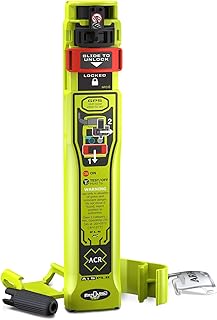
ACR RESQLINK AIS Personal Locator Beacon
Price: $619.95 | Rating: 4.2/5
While not directly related to login, this device provides peace of mind during outdoor adventures—and your family can rely on your life insurance to cover emergency costs.

Dri Mark Counterfeit Bill Detector Marker Pen (1500 Pack)
Price: $729.99 | Rating: 4.7/5
Essential for businesses accepting cash payments. A secure revenue stream means your term life insurance premiums stay consistent.

Safety Magnets Custom Blood Pressure Management Magnets
Price: $269.00 | Rating: 5/5
Promote your health and insurance services with branded magnets. Great for waiting rooms or client giveaways.

brisafe 71″ x 40″ Full Length Wall Mirror
Price: $237.49 | Rating: 4.4/5
Shatterproof and ideal for gyms or dance studios. A healthy lifestyle supports lower life insurance premiums.

ASURION 4 Year Laptop Protection Plan
Price: $279.99 | Rating: 4.4/5
Protect the device you use for Colonial Penn logins. Covers accidental damage and mechanical failure.
Comparison Table of Recommended Products
| Product | Price | Rating | Best For | Buy at Amazon |
|---|---|---|---|---|
| Life Insurance Made Simple | $34.99 | 4.8 | New policyholders | |
| Life Insurance 101 | $14.95 | 4.1 | Quick overview | |
| Insurance Yard Sign | $232.85 | 5.0 | Lead generation | |
| Life Insurance Banner | $235.28 | – | Brand visibility | |
| ACR ResQLink Beacon | $619.95 | 4.2 | Outdoor safety | |
| Dri Mark Counterfeit Pen (1500 pack) | $729.99 | 4.7 | Business security | |
| Safety Magnets (100-pack) | $269.00 | 5.0 | Promotional handouts | |
| brisafe Wall Mirror | $237.49 | 4.4 | Gym & dance studios | |
| ASURION Laptop Protection | $279.99 | 4.4 | Device coverage | |
| Life Health License Study Cards | $43.99 | 4.3 | Exam prep | |
| Life Insurance, 15th Ed. | $150.00 | 4.2 | Advanced study | |
Frequently Asked Questions About Colonial Penn Life Insurance Login
Q: Can I log in to my Colonial Penn account from any device?
A: Yes, you can use a computer, tablet, or smartphone. The website works on all browsers, and the app is available for iOS and Android.
Q: Is the mobile app secure?
A: Absolutely. The app uses bank-level encryption and offers biometric login (Face ID or fingerprint) for extra protection.
Q: I have a term life insurance policy. Can I manage it entirely through the app?
A: Most tasks are available, including payments and document uploads. For comprehensive policy changes (e.g., beneficiary updates), the website is recommended.
Q: What if I lose my phone?
A: Your account is still accessible via the website. Simply log in from a computer and deactivate the app session under “Security Settings.”
Q: Do I need to pay extra for the mobile app?
A: No. The Colonial Penn app is free to download and use. Standard data charges from your carrier may apply.
Q: How do I contact support if the login doesn’t work?
A: Call their toll-free number or use the “Chat” feature on the website or app.
Final Thoughts
The Colonial Penn life insurance login experience is designed to give you flexibility. The website offers a full-featured dashboard for deep policy management, while the mobile app excels at quick check-ins and payments. For term life insurance holders who value speed, the app is a game-changer. For those who prefer reading every detail on a large screen, the website remains the gold standard.
Use both platforms together to never miss a premium payment, update your beneficiaries with ease, and keep your coverage active. And if you want to expand your knowledge, grab one of the recommended books or tools above—they’ll help you make the most of your policy and your financial future.